 HaulerBoss
Getting Started with HaulerBoss
1. Share Your Quote Link
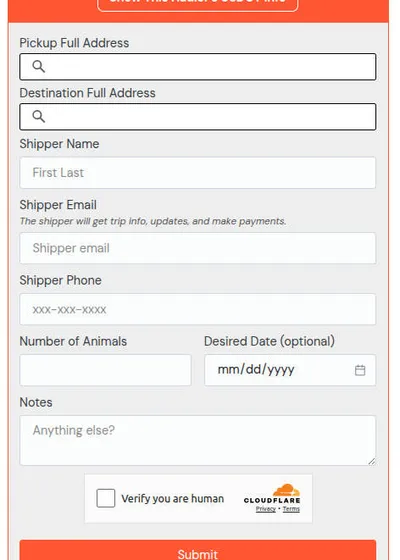
Post or send your personal quote link. Clients fill out all haul details in one simple form using verified addresses.
What the client sees
- A single-page form that collects pickup & delivery addresses (with verified mapping), animal/haul details, and dates, contact info, notes.
What it accomplishes
- Standardizes all incoming quote requests.
- Eliminates back-and-forth messages.
- Ensures all jobs enter HaulerBoss with clean, verified data for mileage, routes, and pricing.
- Automatically puts the request into your Hauls → New list.
Why it's useful
- Every hauler always has a ready-to-share "intake form."
- Works perfectly in Facebook transport groups where shippers ask: "How much to haul from X to Y?"
- Avoids bad addresses, incomplete details, and time-wasting messaging.
2. Review Trip Details
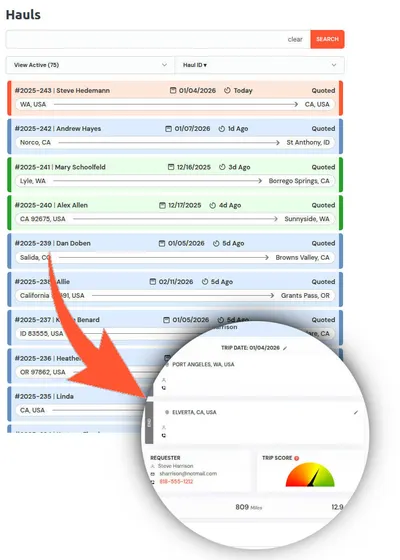
See all the info submitted—pickup/drop-off, animal type, dates, and more—already organized for you.
Core function
- Displays the complete haul request in a single, organized view.
- Aggregates all submitted information into a clear trip summary.
- Automatically calculates distance, drive time, and trip metrics from verified addresses.
What it accomplishes
- Eliminates guessing, re-checking messages, or searching through texts.
- Ensures quoting, routing, and scheduling are based on accurate, complete data.
- Provides a single source of truth for the entire haul lifecycle.
3. Smart Pricing + Trip Score
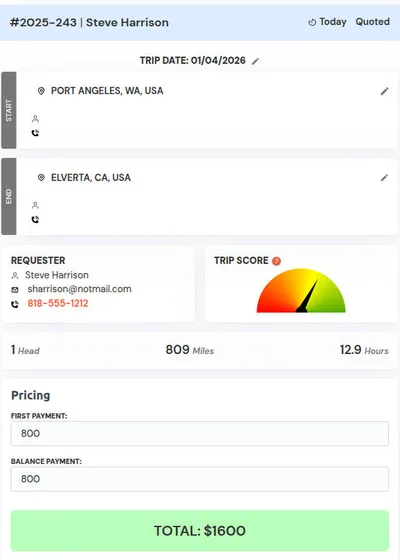
Get suggested pricing based on mileage and route data. Use the Trip Score to spot unusually slow or complex trips.
Core function
- Automatically generates suggested pricing using real mileage, routing, and trip conditions.
- Highlights trip difficulty and risk with a visual Trip Score.
Why it's useful
- Saves time by calculating what would otherwise take multiple tools and maps.
- Helps prevent low-profit hauls by revealing hidden trip challenges.
4. Approve and Send Quote
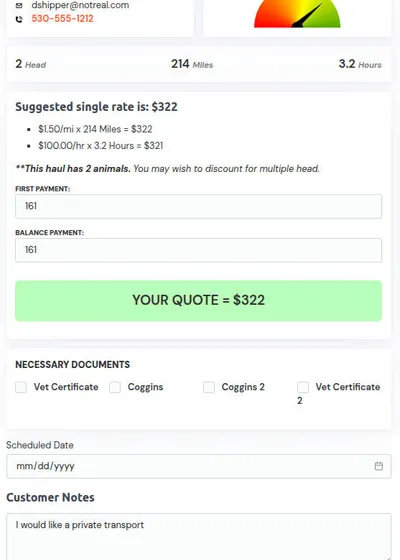
Approve the quote and send it with one click. No copy-pasting, no typing out details manually.
Core function
- Allows haulers to approve a prepared quote and send it instantly.
- Automatically includes all trip details, pricing, and terms.
- Sends a professional, standardized quote without manual formatting.
What the hauler sees
- A finalized quote ready to send with one click.
- Clearly presented pricing and trip information pulled directly from the haul record.
- Confirmation that the quote has been sent to the correct client.
- Quote status tracking once delivered.
What it accomplishes
- Eliminates copy-and-paste errors.
- Removes the need to retype addresses, dates, or pricing.
- Ensures every quote is accurate, complete, and consistent.
- Speeds up the time from request to client response.
Why it's useful
- Saves time on every quote you send.
- Prevents mistakes caused by manual entry.
- Presents a more professional experience to clients.
- Helps you respond faster and secure jobs before competitors do.
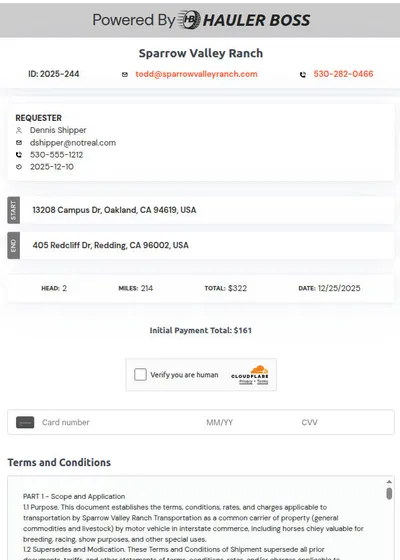
5. Collect Deposit Online
Your client gets a secure link to pay the deposit directly to your account—no chasing, no payment confusion.
Core function
- Generates a secure payment link for client deposits.
- Deposits funds straight into your connected payment account.
Why it's useful
- Saves time and follow-ups.
- Reduces no-shows and last-minute cancellations.
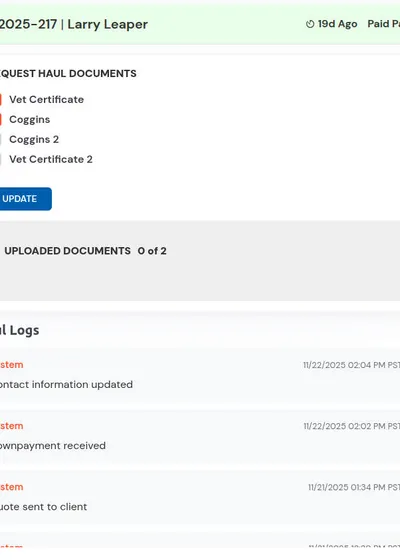
6. Manage Trip in One Workspace
Each trip has its own area where you track document uploads (Coggins, Vet Certificate), contact info, and all client interactions.
Core function
- Creates a dedicated workspace for every haul.
- Centralizes all documents, client details, and communication in one place.
Why it's useful
- Gives each haul a clean, professional workspace.
- Simplifies multi-day and long-distance transports.
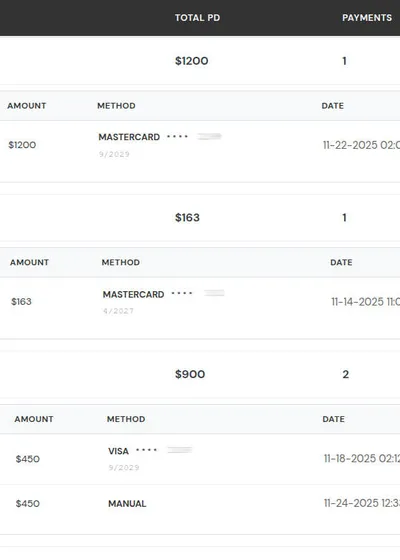
7. Recieve and track Payments
When delivery is complete or balance is due, send the final payment link from the same dashboard and verify all haul payments.
Core function
- Sends secure payment links for balances due or final payments.
- Manages all haul-related payments from a single dashboard.
Why it's useful
- Saves time reconciling payments.
- Improves cash flow visibility.
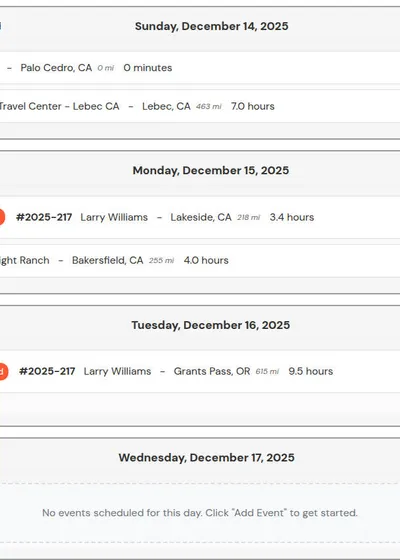
8. Build your Itinerary
Set your routes with haul waypoints as well as overnights and rest stops.
Core function
- Lets you plan your full transport route inside one workspace.
- Adds waypoints for pickups, drop-offs, rest stops, and overnight locations.
Why it's useful
- Makes long-distance or multi-day hauls easier to structure.
- Reduces planning time by keeping all route details in one place.
9. Drive with your Itinerary
Navigate, communicate with contacts on the route and mark stops as completed.
Core function
- Provides a live, trip-ready itinerary you can use while driving.
- Allows you to mark stops as completed as you progress.
Why it's useful
- Reduces stress during long or multi-stop hauls.
- Streamlines trip execution with a structured, mobile-friendly workflow.